
Building & post-frame supply
From a sold Pole Barn Pro job to the profit on it.
StockShift takes the material list a contractor sells in Pole Barn Pro, prices it from that contractor’s price list, splits the buyout between your suppliers and your yard, sends it out on your truck with a bill of lading, and shows what the job made. Cut lists and per-foot metal come along the whole way.
The demo opens on Prairie Post-Frame Supply, a made-up yard with three Pole Barn Pro jobs: two in its Quotes inbox and one in Order Building. Every screenshot on this page comes from it.
The walk-through
One sold job, start to finish.
-
1 · Pole Barn Pro
The sold job lands in your Quotes inbox
When a contractor sells a building in Pole Barn Pro, the job’s material list posts straight to StockShift with a key you issue to that contractor. Nobody types it in again.
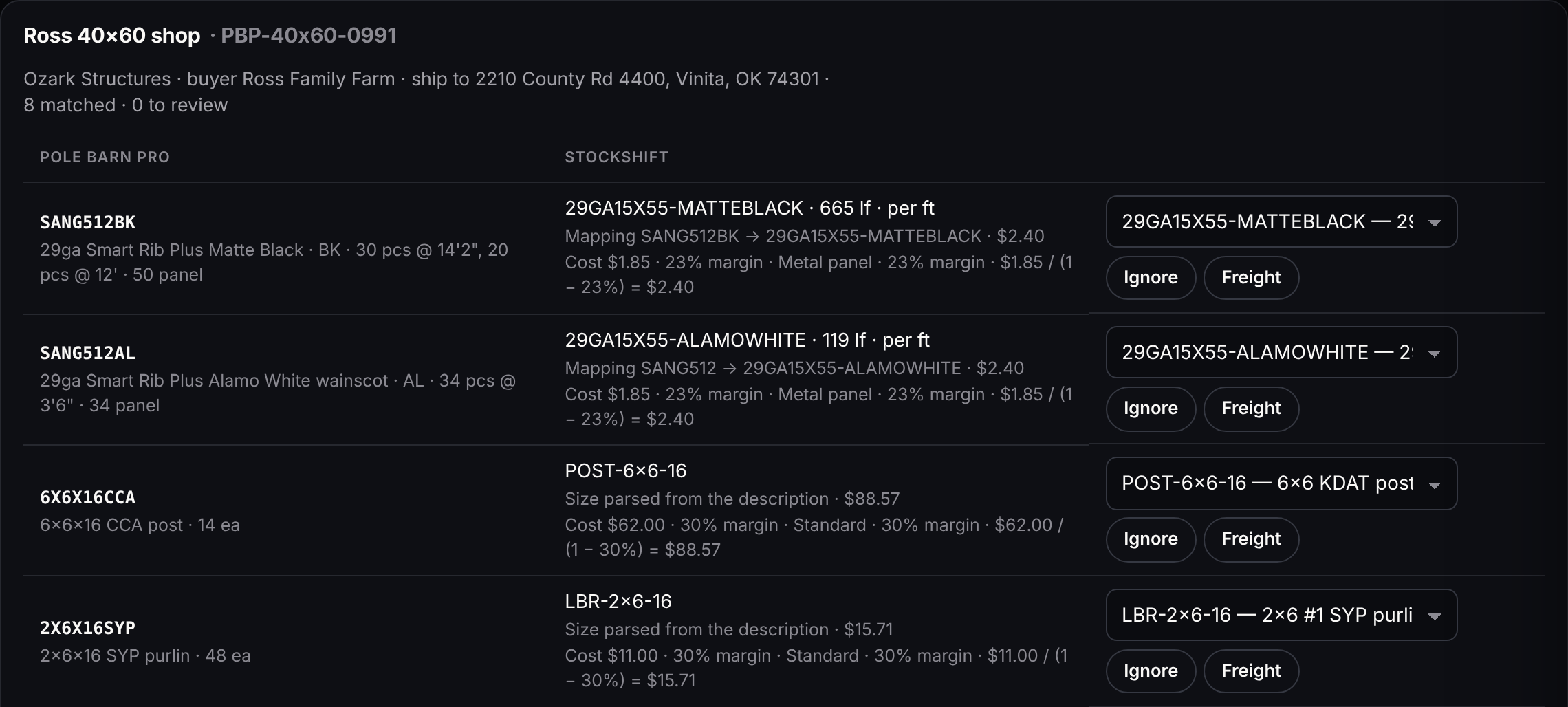
- Every line is matched to your SKU: the same SKU, a match you saved, the Pole Barn Pro item code, or the size and colour in the description.
SANG512BKin matte black becomes29GA15X55-MATTEBLACKin the demo’s catalog. - Cut lists come with it. 30 pcs @ 14'2" and 20 pcs @ 12' of a panel you sell by the foot become 665 lf.
- A line it can’t place is flagged. Pick the product, Ignore it or call it Freight once, and the next import remembers.
- The sell price comes from your price for that contractor when the job lands, never from the request, and a later price change leaves those sold lines alone.
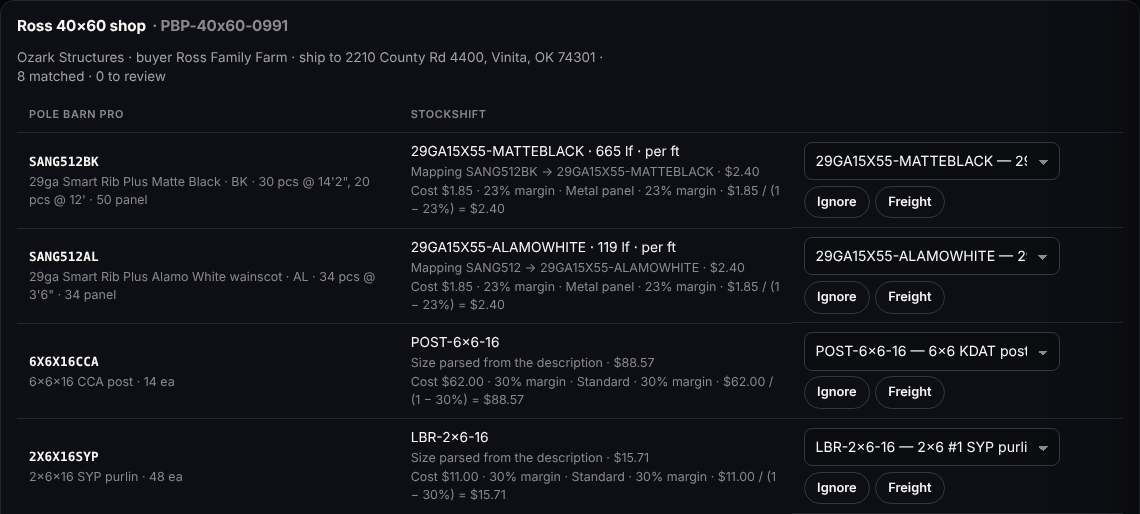
Quotes → Inbox in the demo: a sold 40×60 shop from Pole Barn Pro, each line matched, cut to length and priced, with the rule that priced it. - Every line is matched to your SKU: the same SKU, a match you saved, the Pole Barn Pro item code, or the size and colour in the description.
-
2 · Order Building
Buy it out in Order Building, priced as you go
Start Order Building and the job becomes an order you can still change. It holds no stock and makes no invoice yet.
- Pick a supplier on each line, or From our stock for what’s already in the yard. The same SKU can come from a different supplier on the next job.
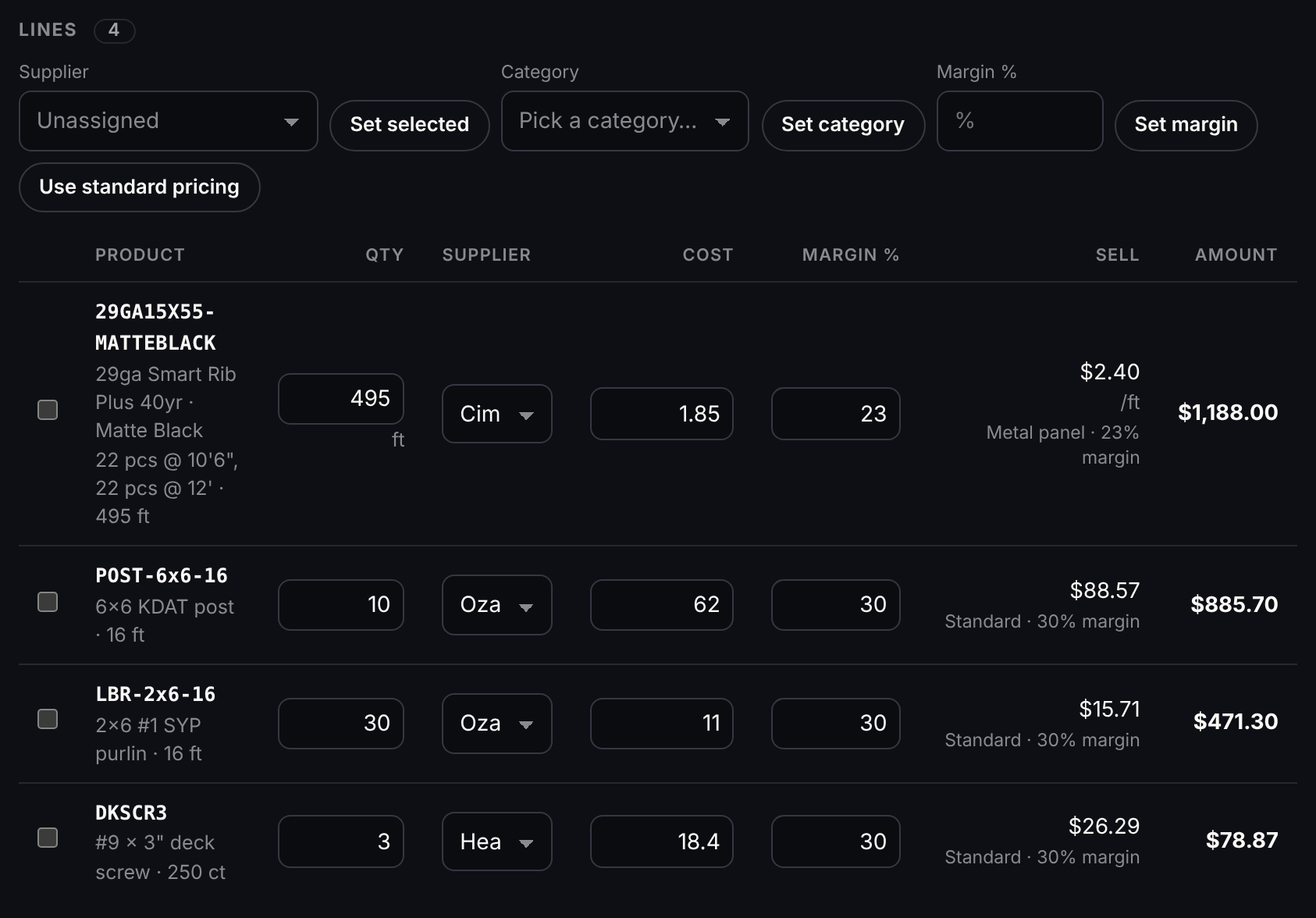
- Sell price = cost ÷ (1 − margin). Type a margin on a line or on the lines you select, or let the contractor’s price list, the supplier’s margin or your book set it.
- A supplier can carry its own margin (0% sells at cost) and one order fee per order.
- Cost, margin and supplier stay inside StockShift. The contractor’s quote, invoice and email show quantities and sell prices; a supplier’s order fee reads Order fee.
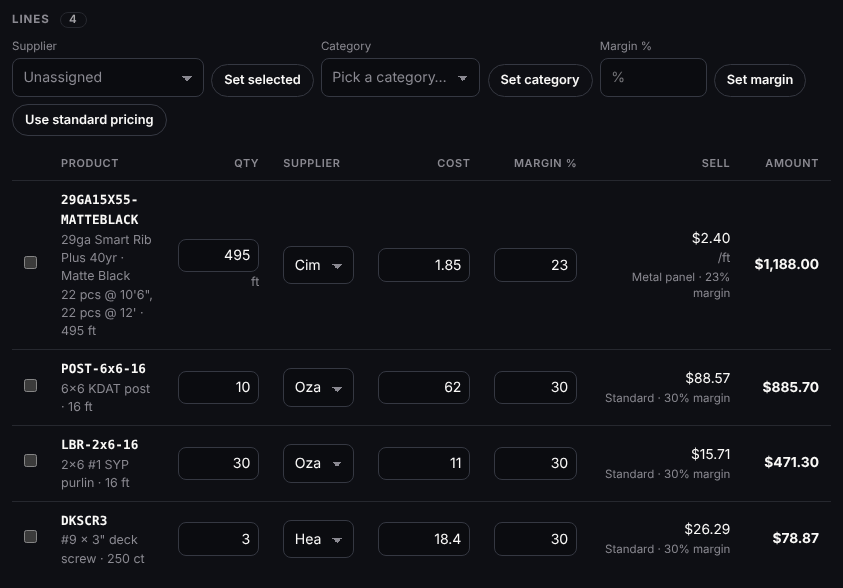
The job’s lines in Order Building: supplier, cost, margin and sell price on each, the metal at $2.40 a foot. -
3 · Supplier orders
Send to suppliers, then one sales order for the contractor
- Send to suppliers writes one supplier order per supplier, with a purchase list to print: the cut list for that supplier.
- Log supplier PO puts the truck on your Receiving board, so it counts as inbound before it arrives.
- Create the sales order and the job becomes one order for the contractor: lines grouped by supplier, stock reserved, and the invoice made with freight and tax.
- Take a deposit on the job before you order steel. It waits on the job until the invoice exists, then pays toward it.
Supplier order Lines Sell Cimarron Steel Supply 1 $1,188.00 Ozark Lumber Mill 2 $1,357.00 Heartland Fasteners 1 $78.87 Sales order for Ozark Structures 4 $2,623.87 The same job, by supplier: what each supplier order sells for, and the goods on the one sales order (freight and tax go on the invoice).
-
4 · Delivery
Out on your truck with a bill of lading
- The order moves across the Delivery board: Sales Order Received, Shipment Date Scheduled, Products Being Picked, Products Picked, Shipment Loaded, Shipment Delivered.
- Products Picked takes the stock off the shelf. A short line shows on the card, and the order can’t move to Products Picked until receiving posts more, unless you Ship partial now: pick what’s here and backorder the rest.
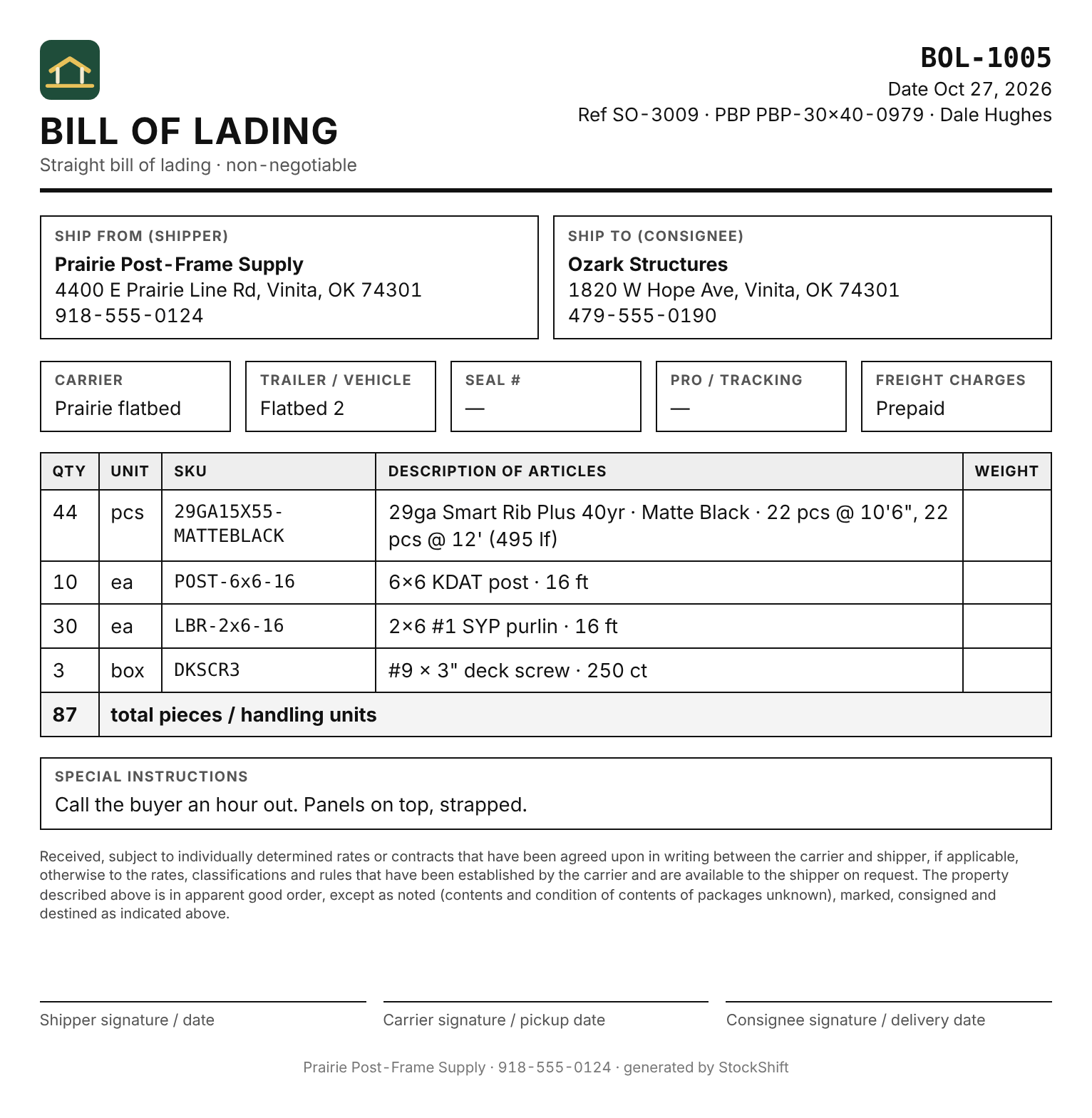
- The bill of lading fills itself in from the order and your company: shipper, consignee, the carrier on the order, the lines and signature blocks. Panels cut to length go on as pieces, with the cut list and the footage beside them.
- Photos of the load and the signed paperwork stay with the order in its job file.
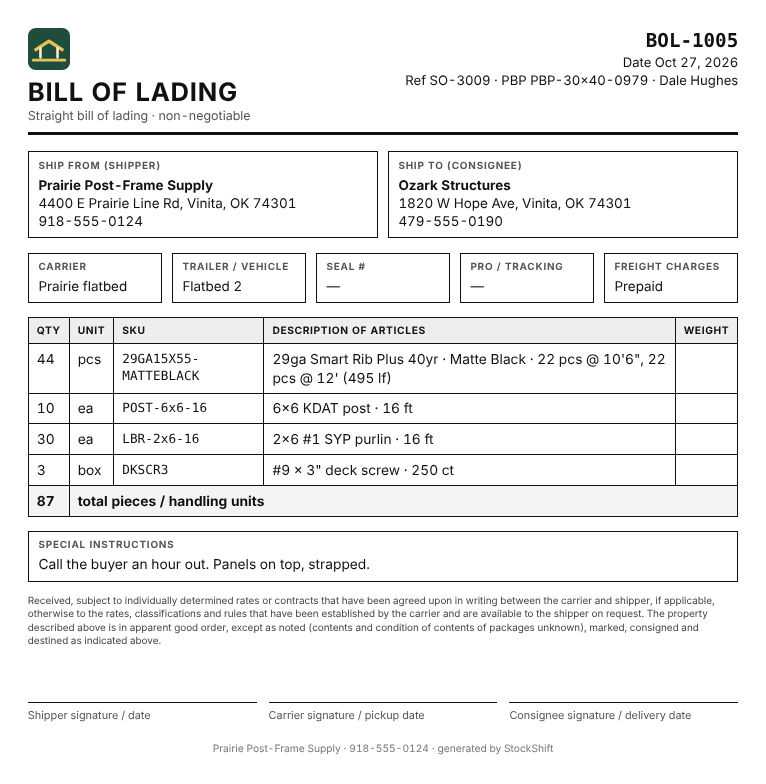
The bill of lading for that job: 44 panels as cut, with the 495 lf beside them. -
5 · Invoice and profit
The invoice holds its prices, and the job shows its profit
- The invoice is made with the sales order and follows it until it goes out.
- Once it’s emailed or marked sent, the order delivered or picked up, or it’s paid or part paid, its prices lock: a later price-list, cost or tax-setting change won’t move it.
- Change the order on purpose after the contractor has the invoice and it’s flagged Revised · re-send. The next email is revision 2 and says which invoice it replaces.
- Record payments and deposits against it. Receivables shows who owes what by age, with statements to print or email, and a payment reminder for an invoice past due.
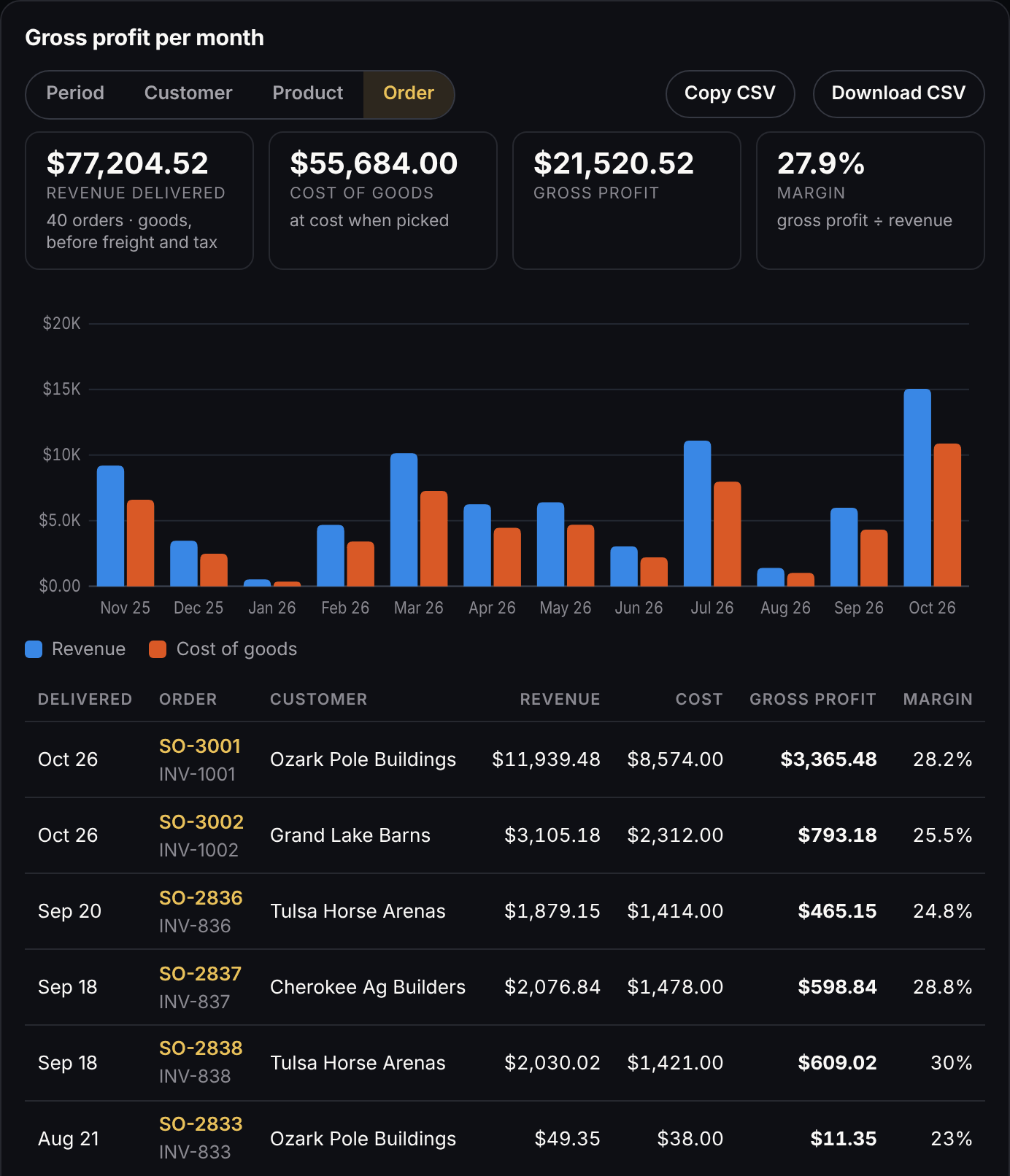
- Analytics shows gross profit per order, customer, product or month, at the cost each line left the shelf at, with a CSV to download.
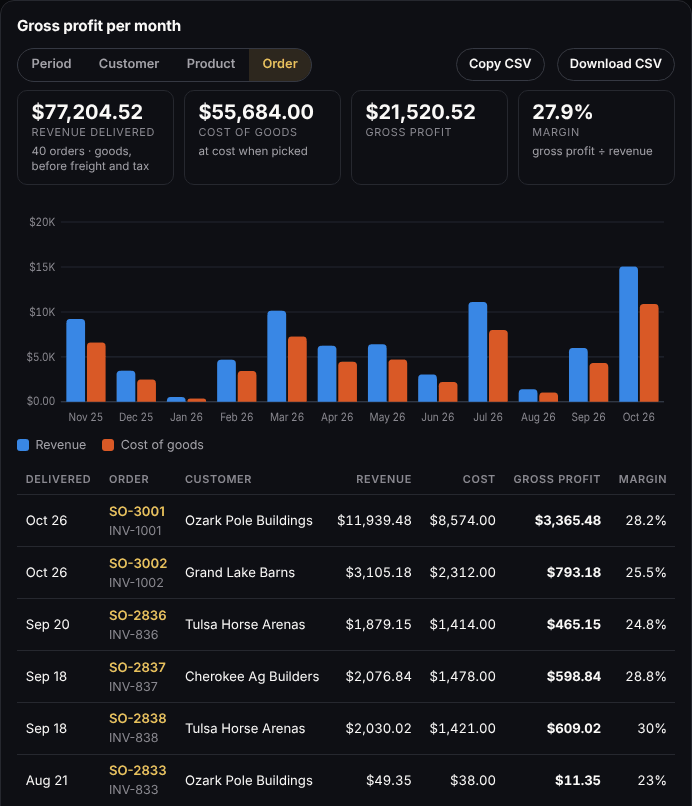
Analytics → Gross profit by order in the demo: revenue, cost, profit and margin for each delivered job.
Contractor pricing
Price lists that stay honest.
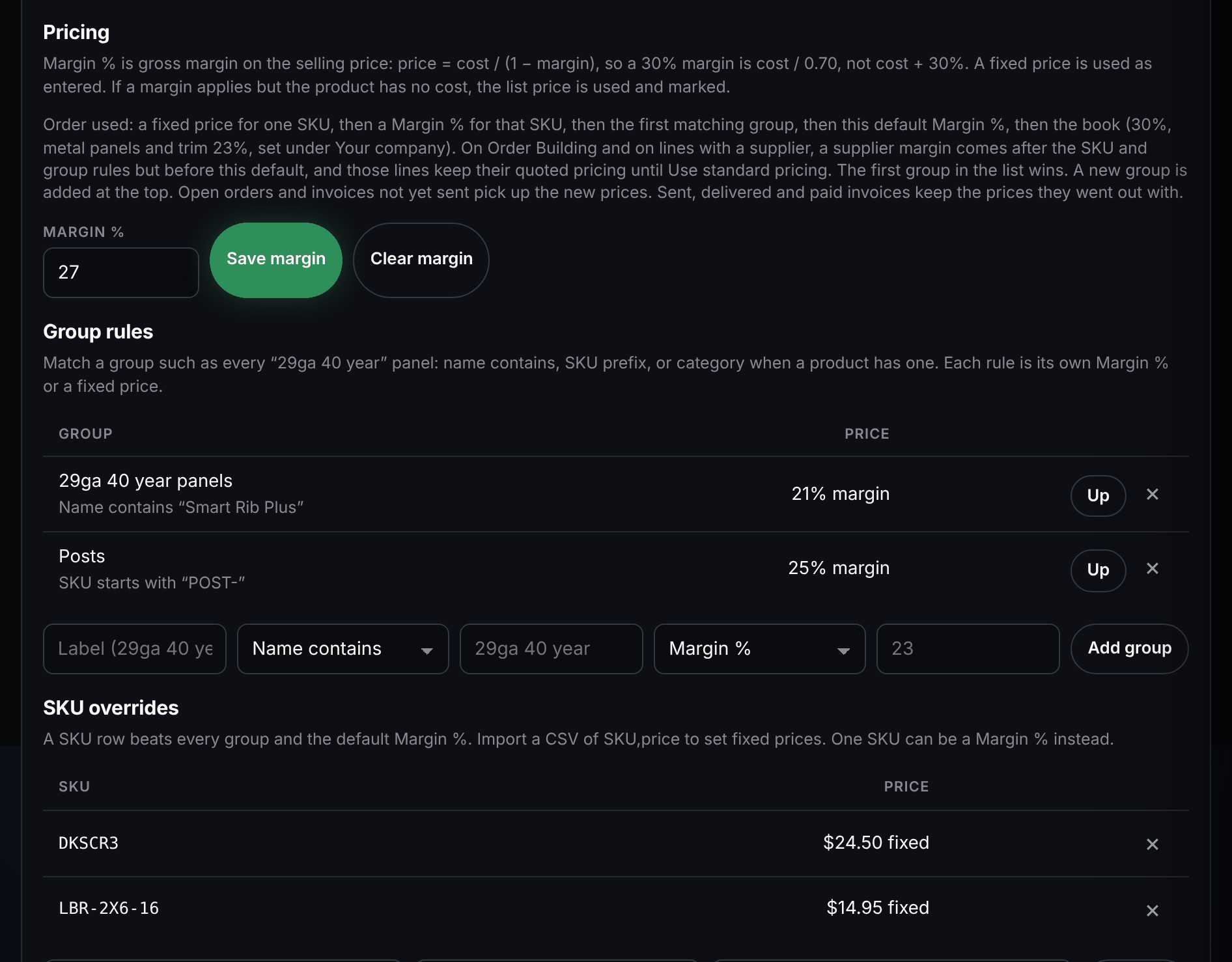
Most yards sell the same panel at several prices. StockShift keeps a price list for each contractor and uses it everywhere: the order form, quotes, Order Building and Pole Barn Pro jobs. Contractors who buy alike can share one price level, such as Contractor or Dealer, set up once: a new contractor is one pick, and what they have of their own comes first.
- A default margin for the contractor, group rules (every 29ga 40 year panel, a SKU prefix, a category) at a margin or a fixed price, and fixed prices by SKU, pasted in from a spreadsheet.
- The first match wins: a fixed price for the SKU, a margin for the SKU, the first matching group, the contractor’s margin, then your book.
- Your book is your choice: each product’s list price, or a margin on cost with one margin for metal panels and trim and another for everything else.
- Pole Barn Pro can read that contractor’s sell prices from StockShift with the same key. It gets the price, the unit, whether it’s per foot and which kind of rule set it (their price list, a group, a fixed price, your standard or list price), never your cost, margin, stock or supplier.
- A change reaches open orders and invoices not sent yet. Sent, delivered and paid invoices keep the price they went out at, and an open quote keeps its prices until its date.
Cut lists
Per-foot metal, cut to length.
Metal sells two ways, and StockShift keeps both straight from the order to the invoice.
- By the foot: a panel with a unit of lf is stocked in linear feet. An order line of 12 pcs @ 14'2" is 170 lf, and 170 is what’s reserved, picked and billed.
- By the piece: a 16 ft sheet or a 10 ft ridge cap keeps its piece price. Give the product a stock length and the order fills it in; type another length over it when the job needs one.
- The cut list follows the line onto the supplier order, the purchase list, the bill of lading and the invoice.
- Lengths read the way people type them: 14'2", 14-2, 14 ft 2 in and a phone’s 14’2” all mean 14 feet 2 inches.
| Line | Cut list | Billed |
|---|---|---|
| 29ga Smart Rib Plus 40yr · Matte Black | 22 pcs @ 10'6", 22 pcs @ 12' | 495 lf |
| 29ga Smart Rib Plus 40yr · Alamo White | 34 pcs @ 3'6" | 119 lf |
| Ridge cap · 10 ft · Charcoal | 7 pcs @ 10' | 7 pcs |
Panels sold by the foot bill the footage of their cut list; trim sold by the piece bills the pieces and keeps the length.
Receiving
Count the truck from a phone.
Steel and lumber come on several trucks. Each truck is its own card, counted where it’s unloaded.
- Several trucks can share one PO, Truck 1 of 2 and Truck 2 of 2, each with its own counts, photos and paperwork.
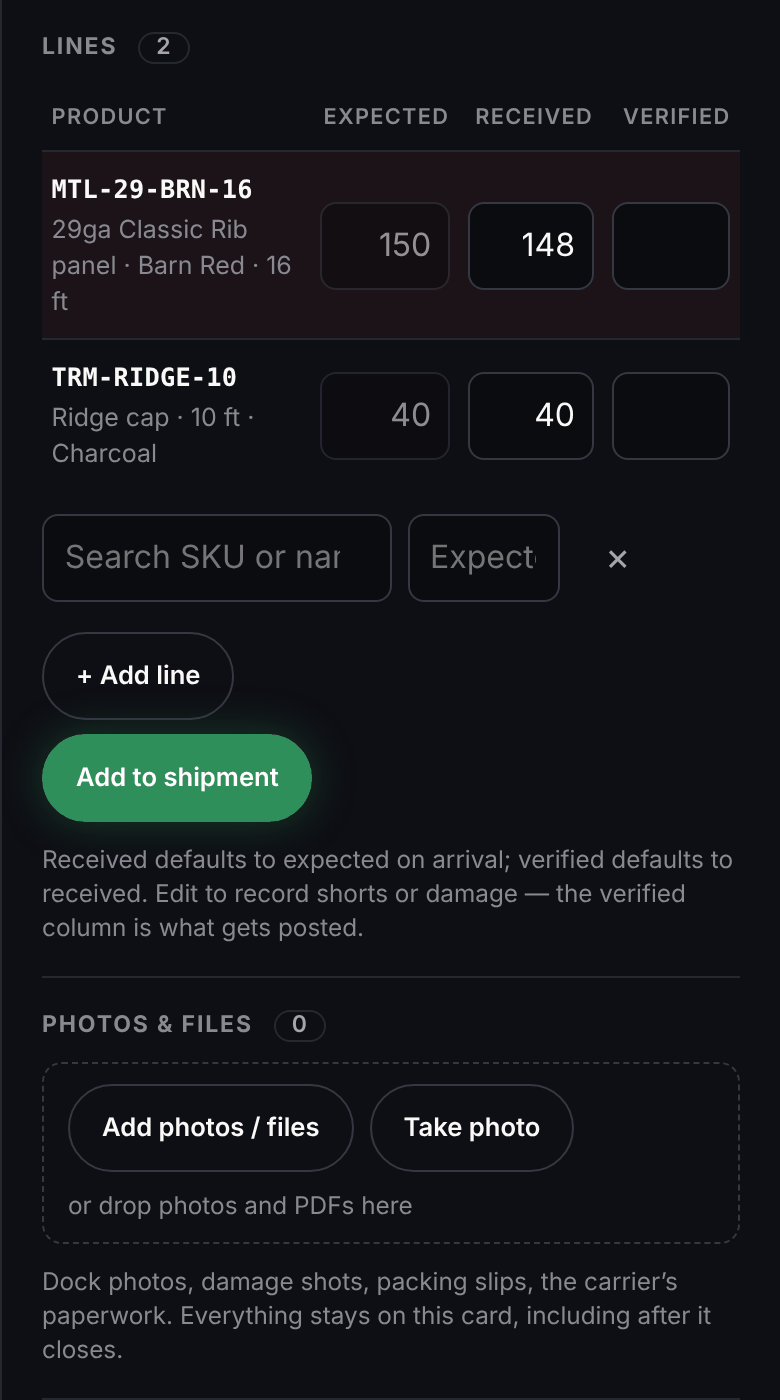
- Received starts at what was expected and verified at what was received. Change either to record a short or damage; the verified count is what posts, once.
- A short line can be written off, kept coming on a new truck on the same PO, or claimed from the supplier as short or freight damage.
- Take photo opens the phone’s camera for damage, packing slips and the carrier’s paperwork, and the pictures stay on the card after it closes.
- The unit cost typed from the supplier’s invoice updates the product’s cost, as a weighted average or the last cost paid, whichever you choose.
- Screws by the box, studs by the bundle, coil by the coil: a product bought in a bigger unit than you sell it in is counted and costed in that unit on the truck and the PO, and goes into stock by the piece or the foot.
- Stock that goes back to the supplier (over-shipped, the wrong colour, damaged after it came in) goes on a return with a slip for the driver and an email to the supplier. It leaves stock when it ships, and the credit is tracked until it comes; what the supplier won’t credit shows as a loss.
Bring a Pole Barn Pro job and your price list.
Open the demo now, or book a walkthrough and we’ll run one of your jobs through it with you.